Free Business Card Maker
Type your details, add your logo and pick a colour. Download a print-ready PDF with bleed and crop marks for a print shop, or PNG images to share. Nothing is uploaded.
Make a business card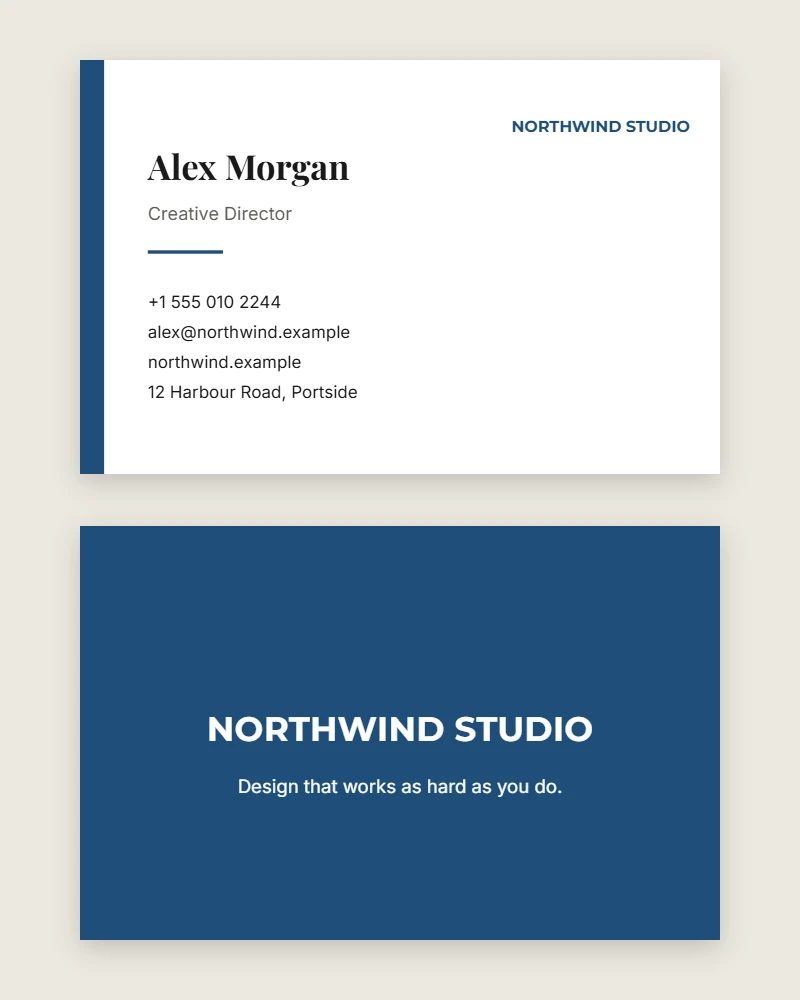
The standard business card size
The card here is 85 by 55 millimetres, the size printers expect across Europe, Africa, Australia and most of Asia. North America uses 3.5 by 2 inches, which is 89 by 51 millimetres: close enough that a design survives the change, but different enough that a print shop will ask, so check before you order.
Both sides are designed together. The front carries who you are and how to reach you; the back carries your business name, logo and a short line about what you do.
Bleed, trim and the safe area
Print shops print several cards on one large sheet and cut them apart. No cutter is perfectly exact, so anything that runs to the edge of the card, such as a coloured background or a stripe, has to extend a few millimetres past the cut line. That extra margin is the bleed, and without it a slightly off cut leaves a thin white sliver along one edge.
The PDF adds a 3 mm bleed to every side automatically and extends edge-to-edge colour into it, then marks the cut lines with crop marks outside the card. Text is kept at least 4 mm inside the edge, the safe area, so a cut that strays does not clip a phone number.
What to put on a business card
Less than you think. Your name, your role, one phone number, an email address and a website cover almost every reason someone keeps a card. A street address is worth including if people visit you; otherwise it crowds the details people actually use.
Leave any line empty and the others close up, so a card without a website does not have a gap where it would be. The tagline on the back works best as one short sentence about what you do, not a slogan.
Sending it to a print shop
Download the PDF with the print shop option on. It holds the front and back as two pages, with real text in embedded fonts, which is what printers ask for. Ask for a heavy card stock, 350 gsm is common, and choose matte if people will write on the cards or gloss if colour matters most. Order a small run first and check every number on the proof: a typo on 500 cards is expensive.
Printing at home
Turn the print shop option off to get a PDF at the exact card size, with no bleed or marks. Print it on card stock of around 300 gsm at full size, not "fit to page", and cut with a guillotine or a craft trimmer rather than scissors. Home printing is fine for a handful of cards; for a box of them, a print shop is cheaper per card and the edges will be cleaner.
Your details stay on your device
The card is drawn and the PDF is built inside your browser. Your name, contact details and logo are saved only in this browser on this device, so you can come back and edit the card later, and nothing is sent to any server.
Common questions
What size is the business card?
85 by 55 millimetres, the standard size in Europe, Africa, Australia and most of Asia. The North American size, 3.5 by 2 inches, is only a few millimetres different, but printers there expect it, so check with yours.
Is the PDF ready for a print shop?
Yes. By default it has 3 mm of bleed on every side and crop marks outside the bleed, the two things a printer asks for. Front and back are separate pages of the same file, and the text is real, selectable text in embedded fonts.
Can I add my own logo?
Yes. Upload a PNG, JPG or WebP file. It appears on the front and larger on the back. A PNG with a transparent background looks best.
Is my information uploaded anywhere?
No. The card is drawn and the PDF is made inside your browser. Your details and logo are saved only on your own device, so you can come back and change them later.
Can I print business cards at home?
Yes. Turn off the print shop option to get a PDF at the exact card size, print it on card stock of about 300 gsm, and cut carefully with a trimmer. A print shop will give cleaner edges and better colour.
Is there a watermark?
No. The PDF and the PNG images carry no watermark and no restriction.
Make your business card
Free, no account, nothing uploaded. Your card saves on this device and downloads with no watermark.
Make a business card